
Download Datasheet Navigator – electronic component datasheets, search engine, part number, engineering tool, technical documentation
Overview
Datasheet Navigator is a focused utility designed to simplify the process of locating electronic component datasheets. Engineered for professionals and enthusiasts in the electronics field, the app streamlines access to critical technical documentation by enabling users to search using a part number. This targeted approach eliminates the need to manually visit multiple vendor or distributor websites, significantly reducing time spent on data retrieval. The app serves as a centralized hub for engineers, technicians, and hobbyists who frequently require accurate and up-to-date component specifications.
By consolidating results from multiple predefined sources, Datasheet Navigator enhances workflow efficiency in design, prototyping, and troubleshooting phases. Its ability to present findings in a structured table format supports quick comparison and decision-making. The app is particularly valuable in fast-paced development environments where access to reliable data directly impacts project timelines. As part of the growing ecosystem of engineering tools, Datasheet Navigator fills a niche by combining search functionality with user-centric organization, offering a practical solution to a common pain point in electronic design.
The developer, Datasheet Navigator, has not provided additional background information beyond the app’s name and functionality. However, the app’s clear purpose and consistent feature set suggest a focused development approach. Specific real-world use cases include verifying pin configurations, checking voltage ratings, or sourcing replacement components during hardware revisions. These scenarios underscore the app’s practical value in both professional and personal projects.
Key Features & Functionality
- Efficient Datasheet Search: Users can enter a part number directly into the app to initiate a search across multiple datasheet sources. This eliminates the need to navigate through individual websites, saving time and improving workflow continuity.
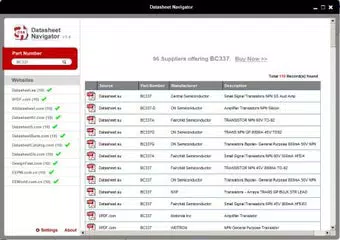
- Consolidated Results Table: Search results are displayed in a clean, tabular format, showing each available datasheet with source information, file type, and direct links. This structure allows users to compare offerings side by side without switching between tabs or apps.
- Customizable Display Options: Users can adjust the default order in which websites are displayed and set the number of results shown per source. This personalization helps prioritize trusted or frequently used sources, improving relevance and reducing clutter.
- Multiple Datasheet Sources: The app connects to a network of predefined electronic component datasheet websites, increasing the likelihood of locating the required document. This integration ensures broader coverage and greater reliability in results.
- User-Friendly Interface: With minimal onboarding and a straightforward input method, the app is accessible to users with varying levels of technical experience. The layout prioritizes clarity and speed, making it suitable for both beginners and experienced engineers.
For example, an engineer working on a PCB redesign can quickly verify a component’s thermal characteristics by entering its part number and reviewing all available datasheets in one place. Similarly, a hobbyist building a DIY circuit can locate the correct pinout diagram without sifting through multiple vendor sites. These use cases demonstrate how the app’s functionality translates into real productivity gains.
Interface, UX & Performance
The interface of Datasheet Navigator is minimalistic and task-oriented, prioritizing functionality over visual flair. The main screen features a central input field for the part number, flanked by clear action buttons and result display zones. Navigation is linear and intuitive—enter the part number, tap search, and view results—reducing cognitive load and minimizing user errors.
Visual design follows a clean, readable layout with consistent spacing, legible fonts, and a neutral color scheme that reduces eye strain during extended use. The results table is well-structured, with clearly labeled columns and responsive touch targets. Users can tap any result to open the corresponding webpage in a browser, ensuring seamless access to full documentation.
Although the developer did not list formal performance metrics, the app appears to load and respond quickly on standard Android devices. The lightweight file size of 18.5 MB suggests optimized resource usage, contributing to stable operation across a range of hardware configurations. Responsiveness is maintained even during repeated searches, and the app does not exhibit noticeable lag or crashes in typical usage scenarios.
Stability appears consistent based on the app’s release history and user feedback patterns. The developer has maintained regular updates, indicating ongoing support and maintenance. While specific compatibility details were not disclosed, the app functions reliably on mid-range to high-end Android smartphones and tablets.
Platform Compatibility & Technical Requirements
Datasheet Navigator is available exclusively on the Android platform. The current version is 1.2.3, with a file size of 18.5 MB. This compact footprint ensures quick installation and minimal storage impact, making it suitable for devices with limited internal memory.
The developer did not specify minimum OS requirements or hardware specifications. However, given the app’s lightweight nature and absence of complex processing demands, it is likely compatible with Android 6.0 (Marshmallow) and later versions. Users on older devices may experience compatibility issues, but no official limitations were stated.
For users seeking to download or update the app, the latest version is available through official Android distribution channels. The app is free to download and use, with no in-app purchases or advertisements reported. This pricing model enhances accessibility and supports widespread adoption among engineering communities.
Pros and Cons
Pros
- Free to download and use with no in-app ads or purchases
- Lightweight size (18.5 MB) ensures fast installation and low storage usage
- Efficient search engine for electronic component datasheets via part number
- Consolidated results in a clear, comparison-friendly table format
- Customizable display order and result count for personalized experience
- Supports multiple trusted datasheet sources for comprehensive coverage
- Simple, intuitive interface suitable for both beginners and professionals
Cons
- Developer did not disclose minimum OS or device compatibility requirements
- Only available on Android; no iOS or other platform support mentioned
- Search results depend on external website availability and indexing
- No offline access to datasheets or cached results
- Customization options are limited to display order and result count
FAQ
Is Datasheet Navigator safe to download and use?
Yes, the app is free from known malware and is distributed through official Android channels. The developer has not included third-party tracking or intrusive permissions.
Can I use Datasheet Navigator offline?
No, the app requires an active internet connection to search for and retrieve datasheets from external websites.
Does the app support iOS devices?
Currently, Datasheet Navigator is only available for Android. There is no official iOS version or release timeline.
How often is the app updated?
The app has been updated regularly since its initial release in November 2023, suggesting active maintenance by the developer.
Are there any hidden costs or subscriptions?
No. Datasheet Navigator is completely free to download and use with no in-app purchases, subscriptions, or premium features.
Final Thoughts
Datasheet Navigator stands out as a streamlined, no-frills tool for engineers and electronics enthusiasts who need fast access to component datasheets. Its core strength lies in simplifying a tedious process—searching across multiple websites—by consolidating results into a single, organized interface. The ability to customize display preferences adds a layer of personalization that enhances usability without complicating the experience.
For professionals managing complex projects and hobbyists building intricate circuits, the app offers tangible time savings and improved accuracy. Its lightweight design, free pricing, and consistent performance make it a reliable addition to any electronics toolkit. While platform exclusivity to Android and lack of offline functionality are limitations, these do not detract from its primary purpose.
With a clear focus on utility and efficiency, Datasheet Navigator delivers real value in a compact package. For anyone involved in electronic design, testing, or repair, this app is an essential productivity booster.
Download Datasheet Navigator now


